Language Additions
Augment language highlightin capabilities
Enhance your code’s clarity with granular syntax highlighting.
Overview
Section titled “Overview”Language Additions significantly improves the IDE’s syntax highlighting by allowing you to individually colorize keywords, functions, and primitives. This creates a more readable and vibrant coding environment, helping you instantly distinguish between different code elements.
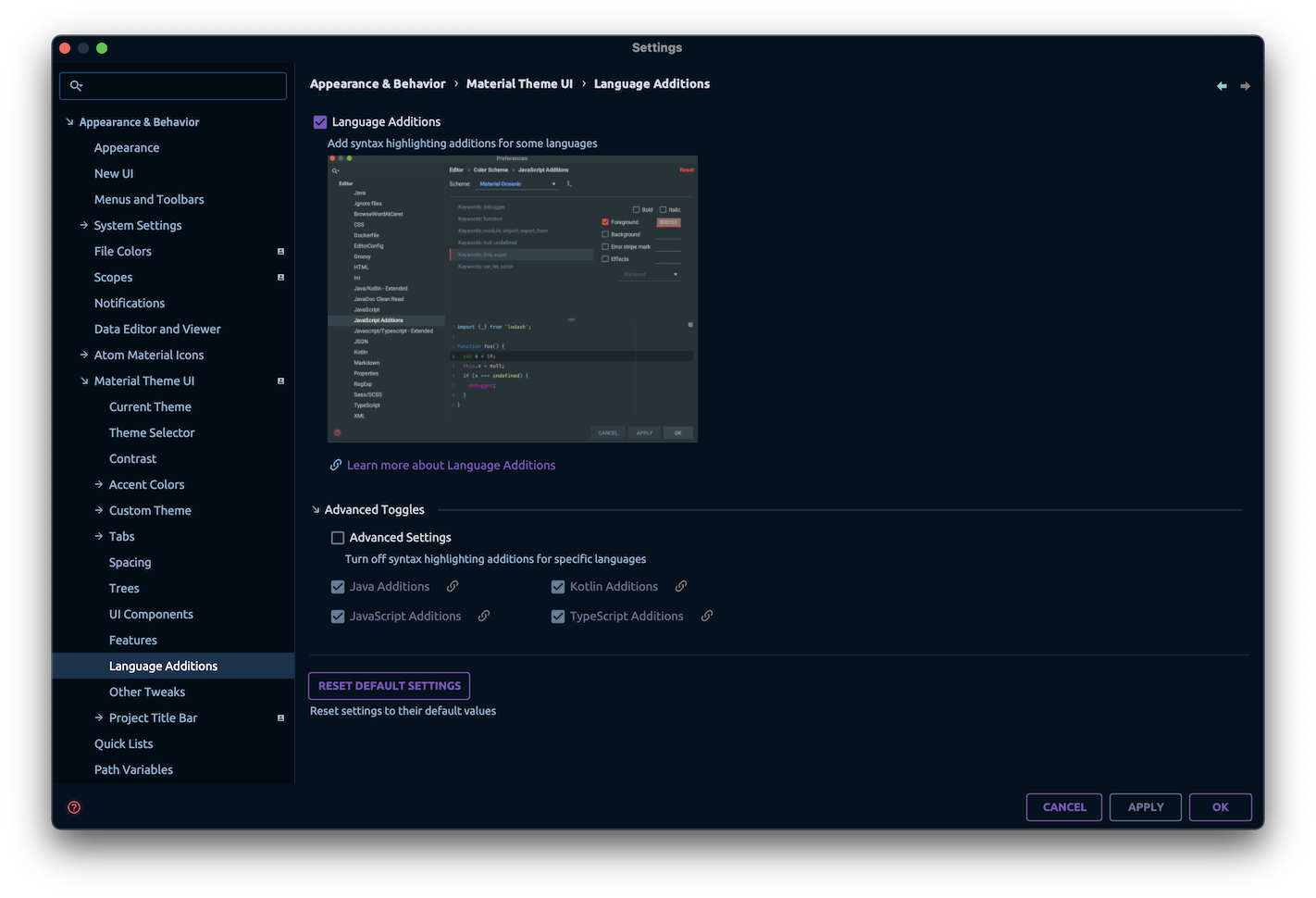
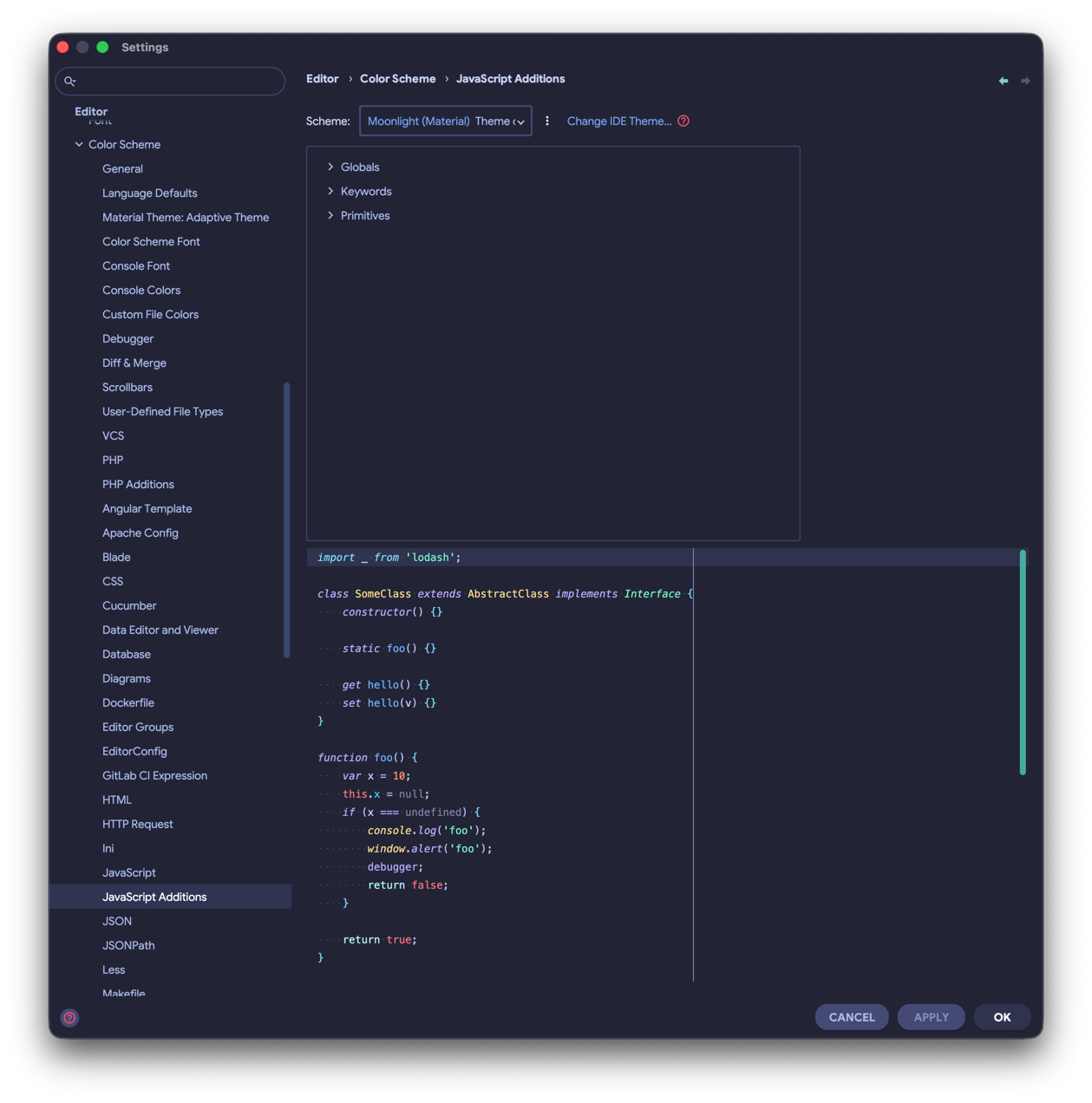
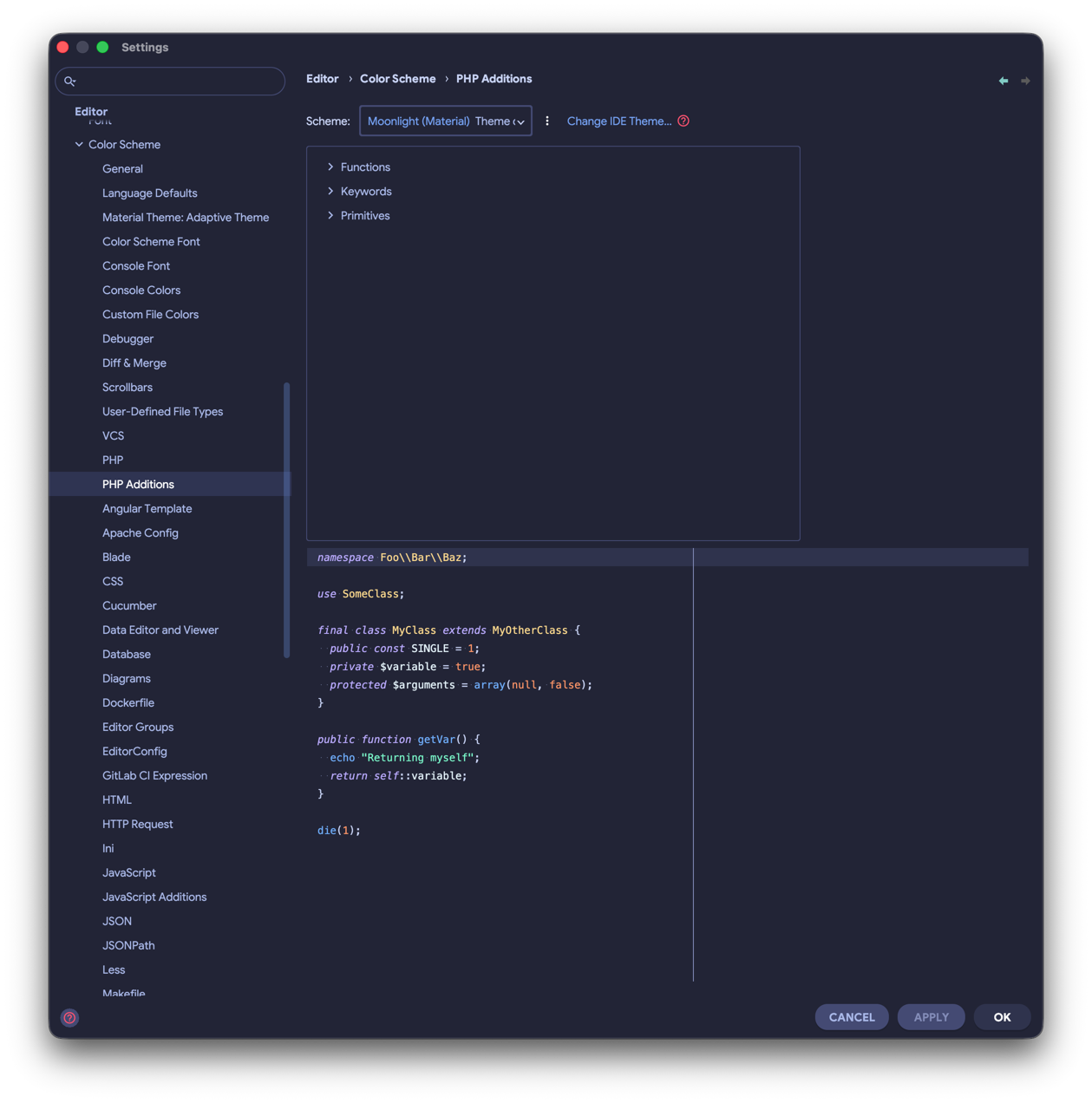
These additions are integrated directly into the Color Scheme settings pages for each supported language, titled <Language> Additions.
Supported Languages
Section titled “Supported Languages”Language Additions are currently available for several popular languages:
- Java
- Kotlin
- JavaScript
- TypeScript
- PHP
- Python
- Ruby
- Go
- Rust
- HTML
- CSS
Custom Language Additions
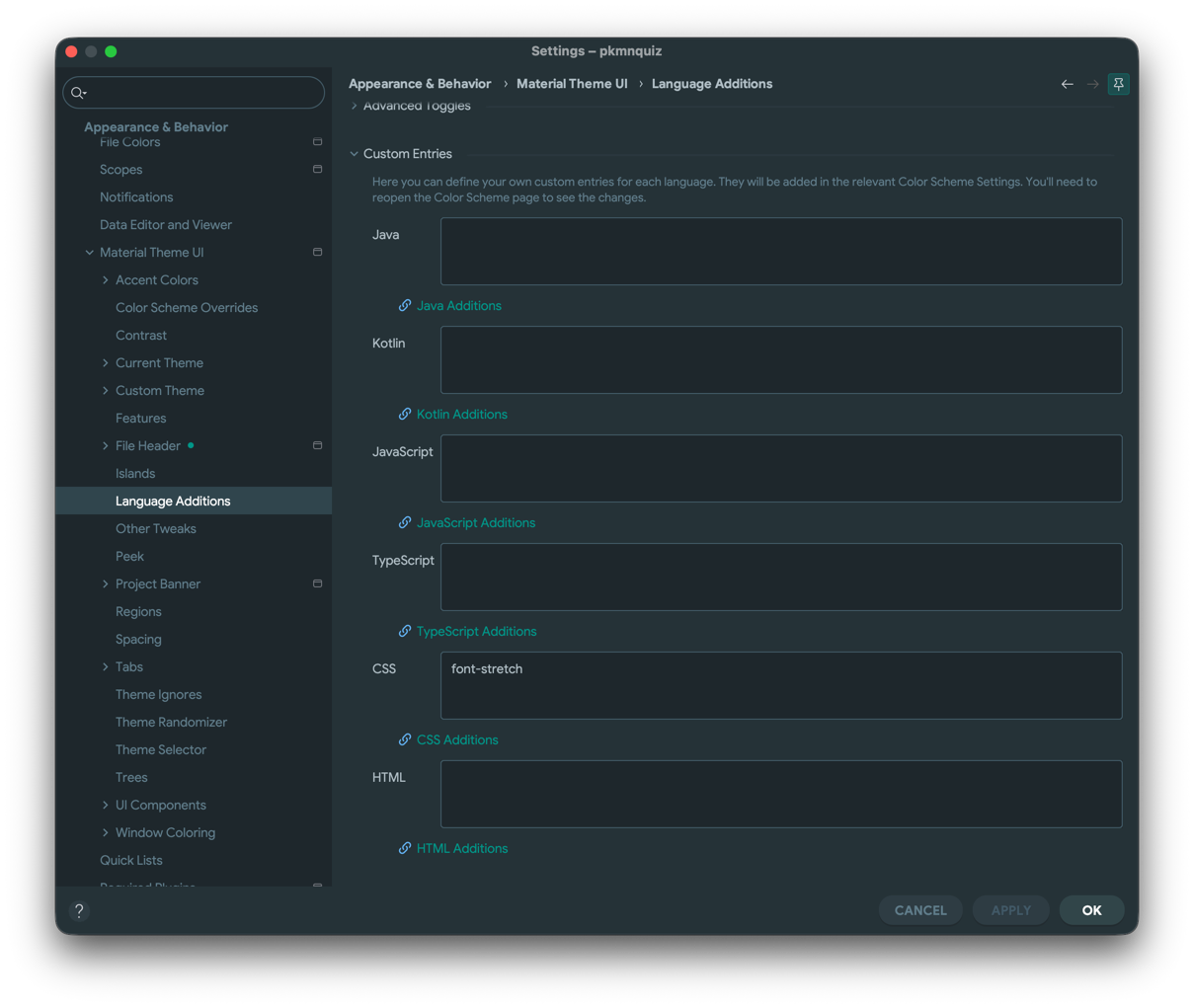
Section titled “Custom Language Additions”You can extend syntax highlighting beyond predefined keywords by defining your own custom entries for any supported language. Whether you want to highlight project-specific utility functions, domain models, or distinct naming conventions, custom entries let you assign individual colors on the fly.
How to Configure Custom Additions
Section titled “How to Configure Custom Additions”- Open Settings | Appearance & Behavior | Material Theme | Language Additions.
- Expand the Custom Entries group.
- Enter comma-separated or newline-separated identifier names for your desired language.
- Wildcards: You can append an asterisk
*to define prefix-matching patterns (e.g. enteringuse*will automatically match and highlightuseState,useEffect,useCustomHook, etc.). - Click OK (you need to reopen the settings for the elements to be added).
- Navigate to the language’s additions color scheme page (e.g. Editor | Color Scheme | JavaScript Additions) — your custom entries will
appear under the
Customcategory (e.g.Custom//useState), ready for individual color customization.
Language Additions Providers
Section titled “Language Additions Providers”To streamline highlighting for popular modern frameworks and libraries without manual entry, the plugin includes built-in Language Additions Providers. These providers automatically categorize and expose framework-specific constructs into the respective Color Scheme settings pages.
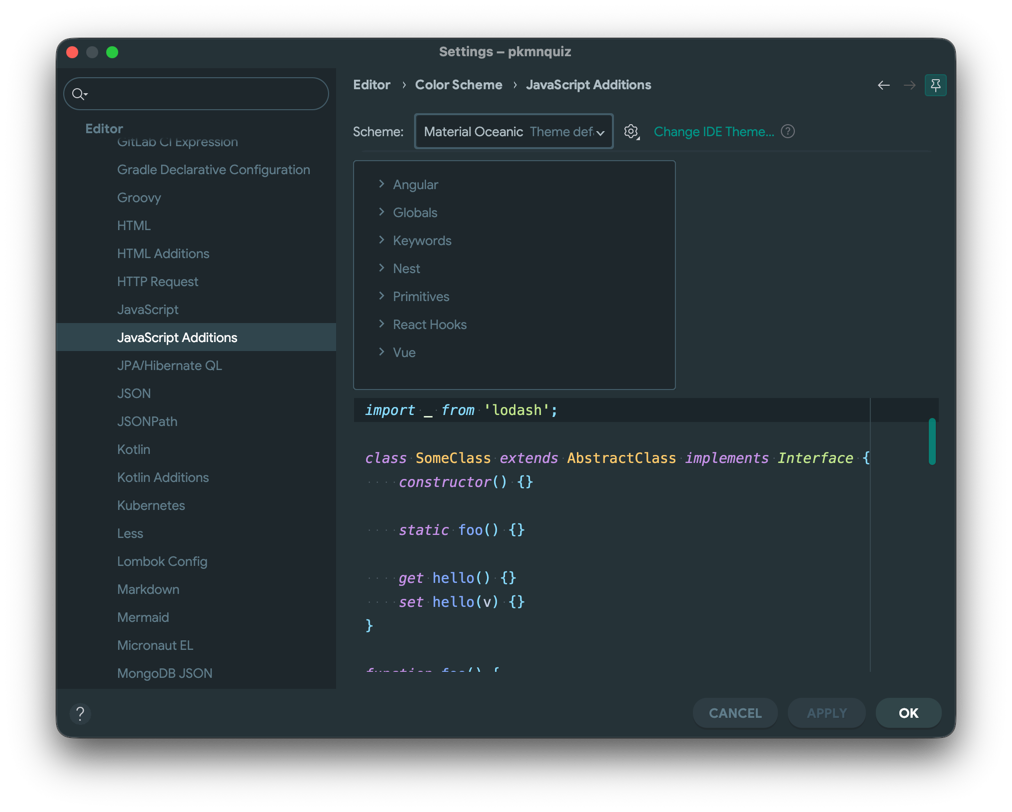
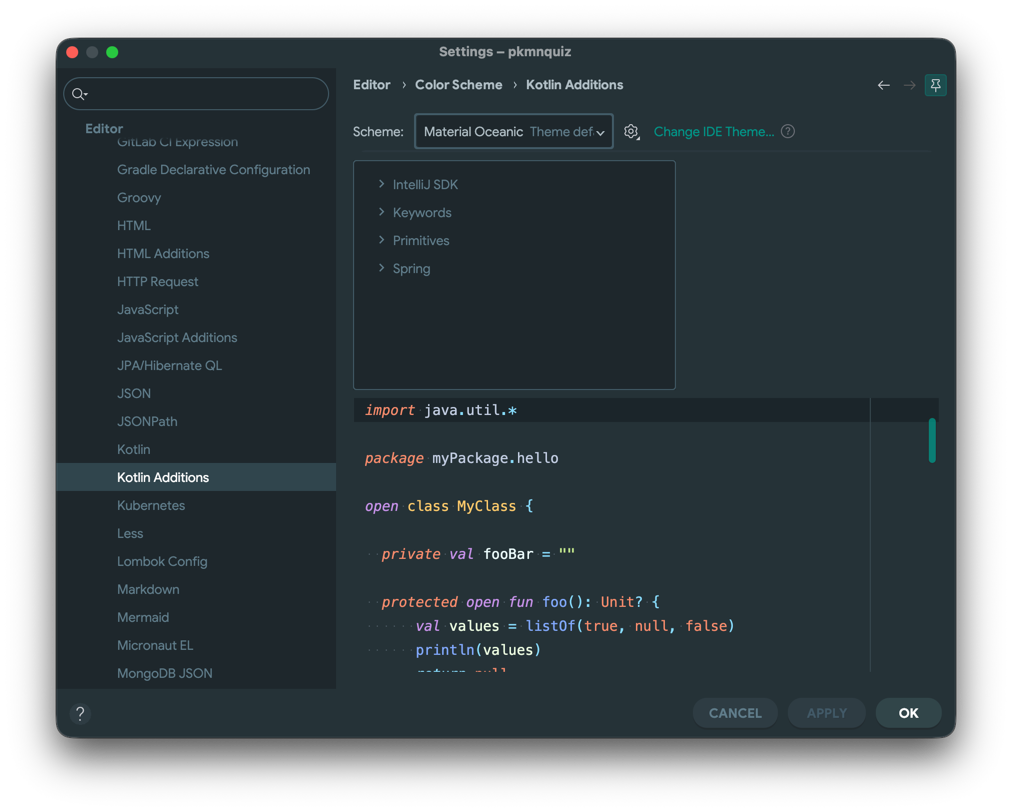
Built-in Providers
Section titled “Built-in Providers”- React Hooks:
useState,useEffect,useContext,useReducer,useMemo,useCallback, etc. - Angular:
@Component,@Injectable,@Directive,@Pipe,ngFor,ngIf… - Vue:
use*,watch*,computed,ref,reactive… - NestJS:
@Controller,@Injectable,@Module,@Get,@Post… - Django:
@login_required,@app.route,views.View… - Spring:
@Controller,@Service,@Repository,@Autowired,@Component… - Laravel:
@Route,@Controller,@Middleware… - IntelliJ Platform SDK:
@NotNull,@Nullable,Project,PsiFile,ApplicationManager… - Rails:
before_action,after_save,validate,has_many,belongs_to…
Contributing Providers (For Plugin Developers)
Section titled “Contributing Providers (For Plugin Developers)”Plugin authors can contribute their own language additions by implementing the LanguageAdditionsProvider interface and registering it via
the extension point in plugin.xml:
<extensions defaultExtensionNs="com.chrisrm.idea.MaterialThemeUI"> <languageAdditionsProvider implementation="com.example.MyCustomAdditionsProvider"/></extensions>class MyCustomAdditionsProvider : LanguageAdditionsProvider { override val name: String = "My Framework" override val languages: Set<MTLanguage> = setOf(MTLanguage.TYPESCRIPT, MTLanguage.JAVASCRIPT) override val names: Set<String> = setOf("myMacro", "inject*", "defineService")}JavaScript / TypeScript
Section titled “JavaScript / TypeScript”The following elements can be customized:
this,superif,else,for,while,doconstructorreturn,yieldnew,throwasync,awaittry,catch,finallyexport,import,require,from,default,moduledebuggerprototypenull,undefined,NaNtrue,falsevar,let,constfunction,staticget,setabstract,class,extends,implementsconsole,window,document,globalin,of,instanceof,typeof,aspublic,private,protected,readonlydeclare,namespacetype,interface,aliasany,unknown,neverkeyofenumnumber,string,boolean,object,symbol,bigint,voidsatisfies,using
The following elements can be customized:
abstract,extends,implements,nativeassertbyte,short,int,long,float,double,char,boolean,voidclass,interfaceenumfor,while,doif,elsepackage,importinstanceofmodule,exports,requires,opens,provides,uses,with,transitivenewtrue,falsenullprivate,protected,publicreturnstaticfinalswitch,case,defaultsynchronized,volatile,transientthis,superthrow,throwstry,catch,finallyvar
The following elements can be customized:
echoexit,diefunctionnullprivate,public,protectedselfstatic,finaltrue,falseuse,namespace
Kotlin
Section titled “Kotlin”The following keywords can be customized:
private,public,protected,internalsealed,override,openobject,companiondataoperator,infixthis,supernull,Unitimport,packagetrue,false
Python
Section titled “Python”The following elements can be customized:
True,False,Noneasasync,awaitclassdefif,elif,else,while,for,doimport,fromprintraisereturn,yieldtry,except,finallywith
Keywords:
require,require_self,require_relativedefclassmodule,namespaceif,elsif,else,unlessprivate,protected,publicreturn,yieldraisecasewhenwhile,until,loopbegin,rescue,finallyselfnot,and,ordo
Primitives:
niltrue,false
Methods:
attr_reader,attr_writer,attr_accessor,attr_accessibleinitializenewputs
Functions:
mainmakelen,capPrint,Println,Printf
Keywords:
import,packagefuncif,elseswitch,case,default,fallthroughfor,range,mapreturnvar,consttypedeferstructinterfacego,selectchan
Primitives:
niltrue,false
The following keywords and elements are customizable:
asasync,awaitcratedynenumexternfnif,elseimpllet,constloop,while,for,break,continuematchmodmovemut,refpubself,Selfstaticstructreturn,yieldtraittrue,falsetypeunsafeunionusewhere_
Customize colors for individual HTML tags and attributes to structure complex markup and distinguish semantic containers at a glance.
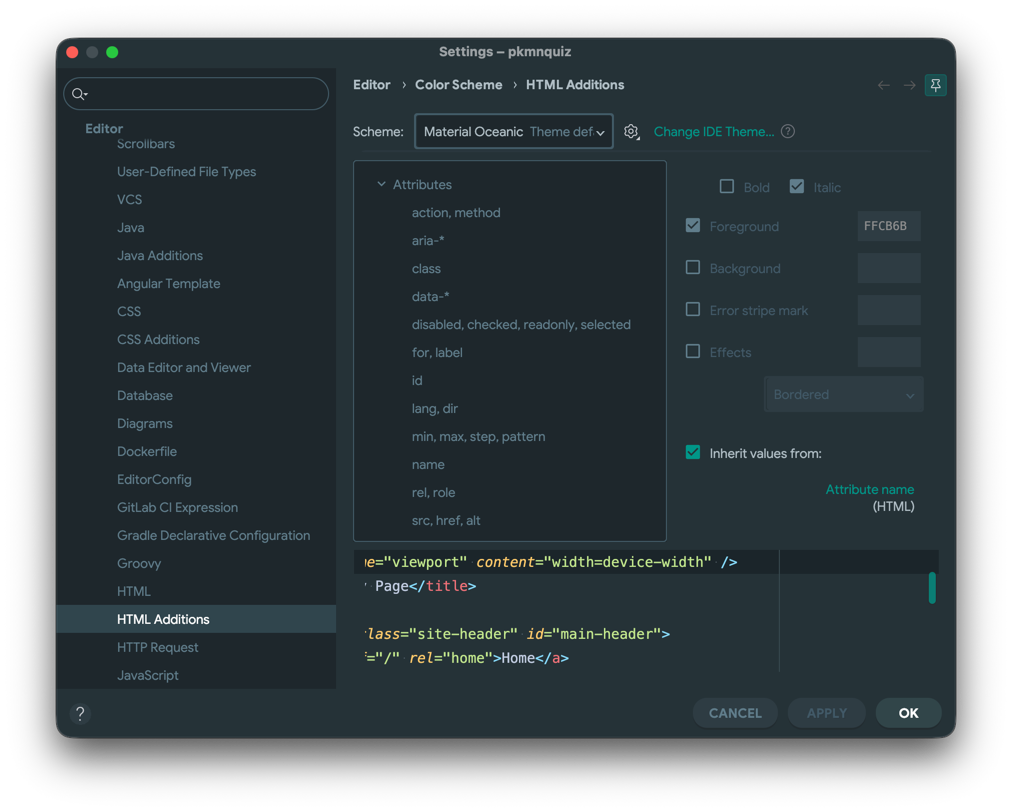
Customizable Tags:
- Semantic Tags:
header,nav,article,footer,aside,section, etc. - Headers:
h1,h2,h3,h4,h5,h6 - Media:
img,video,audio,picture,source,track - Forms:
form,input,button,select,textarea,option,optgroup,fieldset,legend,label - Tables:
table,caption,colgroup,col,tbody,thead,tfoot,tr,td,th - Lists:
ul,ol,li,dl,dt,dd - Links:
a - Containers:
div,span,p - Line Breaks:
br,hr,wbr - Meta / Document:
head,meta,title,base - Structure:
html,body - Dialogs:
dialog - Embedded Content:
iframe,embed,object,canvas,svg - Layout:
main,section,aside - Text Formatting:
strong,em,b,i,small,code,pre - Figures:
figure,figcaption - Interactive:
details,summary - Misc:
time,mark,template,slot
Customizable Attributes:
- General Attributes:
class,id,style,title,name,type,value - Sources & URLs:
src,href,alt,action - Language & Text Direction:
lang,dir - Relations & Roles:
rel,role - Form Actions & Methods:
action,method - Boolean Attributes:
disabled,checked,readonly,selected,required - Validation:
min,max,step,pattern - Accessibility & Custom Data:
aria-*(aria),data-*(data) - Labels & Forms:
for,label
Fine-tune syntax colors for CSS properties, pseudo-selectors, functions, and at-rules to quickly scan styles and variables.
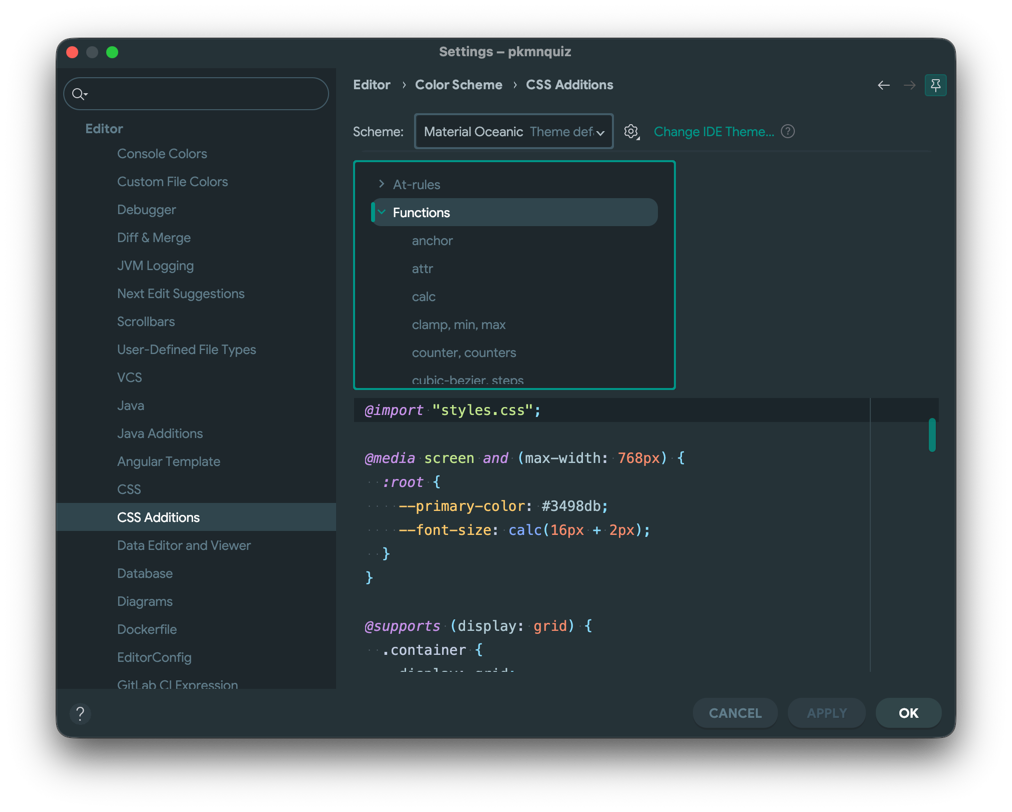
Customizable Elements:
- At-Rules:
@import,@media,@supports,@keyframes,@font-face,@layer,@container,@page,@namespace - Layout & Positioning:
display,position,top,right,bottom,left,z-index,float,clear,overflow,visibility - Flexbox & Grid:
flex,flex-direction,flex-wrap,justify-content,align-items,align-content,grid,grid-template-columns,grid-template-rows,gap - Spacing & Sizing:
margin,padding,width,height,min-width,max-width,min-height,max-height,box-sizing - Typography:
font-family,font-size,font-weight,font-style,line-height,text-align,text-decoration,text-transform,letter-spacing,white-space - Colors, Backgrounds & Borders:
color,background,background-color,background-image,border,border-radius,border-color,border-width,border-style,outline - Effects & Transforms:
box-shadow,text-shadow,opacity,transform,transition,animation,filter,backdrop-filter,cursor,pointer-events,user-select - Pseudo-classes & Pseudo-elements:
:root,:hover,:active,:focus,:focus-visible,:focus-within,:disabled,:first-child,:last-child,:nth-child(),::before,::after,::placeholder,::selection - Functions:
calc(),min(),max(),clamp(),rgb(),rgba(),hsl(),hsla(),var(),url(),linear-gradient(),radial-gradient(),translate(),scale(),rotate(),attr()
Advanced Toggles
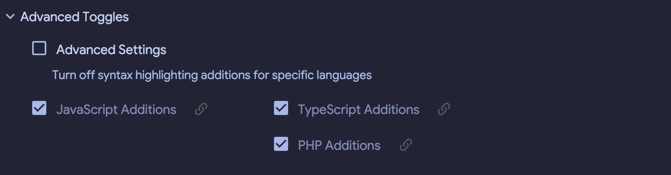
Section titled “Advanced Toggles”Individual Language Additions can be enabled or disabled globally through the Advanced Settings page.
Q: The feature doesn’t seem to be working. My keywords like var or this are the same color as the default keyword color, even though
I’m using a different color scheme.
A: Since these are Additions, most color schemes are not natively aware of these specific entries and will fall back to the default keyword color defined by that scheme.
To fix this, you can manually customize the colors in the Language Additions settings page. If you’re a theme designer, you can include these color definitions in your exported schemes so that users who have the plugin installed can see your custom highlighting.
Theme
Material
Material (more)
Other
Other (2)
Other (3)